 A DominionAMS feature
Form Broadcast™
Enter it once. Broadcast it where you need it.
You already have your client's information. Why should you have to enter it again?
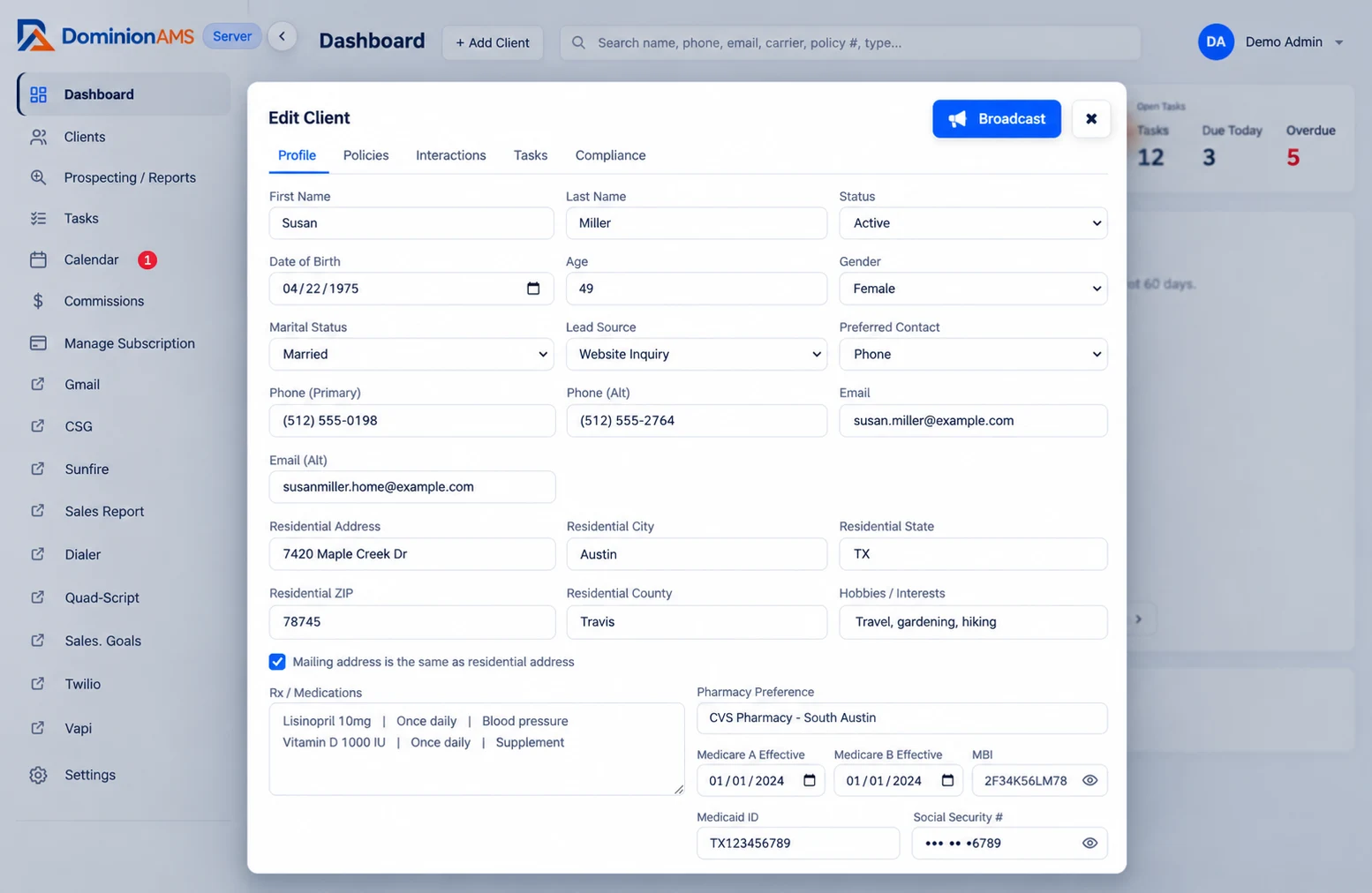
Form Broadcast by DominionAMS helps you move existing client information from your CRM into supported quoting platforms, carrier websites, and online forms — without starting from scratch every time.
Less repetitive data entry
Use the information already stored in DominionAMS instead of typing it into every new screen.
Fewer manual errors
Every retype is a chance for a typo. Fewer retypes keep client details consistent from form to form.
Faster agent workflows
Spend more time with clients and less time typing the same name, birthday, and address again.
Your time belongs to your clients. Not to repetitive data entry.
You've already collected your client's name, date of birth, address, and contact information.
Instead of treating every website like a new client intake, DominionAMS helps you carry existing client information into the next part of your workflow.
That's the problem Form Broadcast was created to solve.
From your client record to your next form.
Open your client.
Select the client you're working with inside DominionAMS. Their information is already organized in one place.
Use Form Broadcast.
Click Broadcast, then choose the supported destination where you want to work.
Review and continue.
Form Broadcast helps populate recognized fields using your existing client information. Review everything for accuracy, complete any remaining questions, and continue the process.
Form Broadcast assists with data entry. It does not make coverage decisions or submit applications on your behalf.
Made for the way Medicare agents actually work.
Form Broadcast grew out of a simple observation: Medicare agents spend too much time moving the same information between systems that don't communicate with one another.
We built a practical browser-based solution around that problem.
Originally developed as KundPro Broadcast in March 2026, the technology was designed to help connect an agent's client records with external quoting and carrier websites. Today, that philosophy continues with DominionAMS.
Client records
Keep client information organized and up to date in one place.
Quoting tools
Use client data to start quotes faster.
Carrier forms
Populate recognized fields on supported carrier websites.
Enrollment workflows
Keep your enrollment process moving, with you reviewing every step.
Your CRM should do more than store information. It should help you use it.
One client. One record. Multiple destinations.
Form Broadcast helps turn the information you've already stored into action, so your workflow keeps moving.
See DominionAMSOne feature. Part of a bigger picture.
Form Broadcast is just one way DominionAMS makes managing a Medicare book easier. Keep your client relationships, policies, commissions, reminders, and follow-up organized in one place — and reduce repetitive work when it's time to move between systems.
No charge during AEP through December 5 · then $29.99/month
DominionAMS. Built by a Medicare agent. For Medicare agents.